Hipocap Shield currently supports Python only. The Hipocap Shield integrates with Laminar for observability, which supports both Python and TypeScript. However, the security analysis features (Shield) are only available in Python.

Quick Start Guide

Step 1: Install Hipocap

Install the Hipocap Python package:
pip install hipocap
Or with your package manager:
# Poetry
poetry add hipocap

# uv
uv add hipocap

# pip with requirements.txt
echo "hipocap" >> requirements.txt
pip install -r requirements.txt

Step 2: Get Your API Keys

You’ll need API keys for Hipocap:
  1. Hipocap API Key (HIPOCAP_API_KEY): For security analysis and observability
    • Book a demo to get access to Hipocap Cloud, or
    • Use your self-hosted instance (see Hosting Options)
    • Get this from your Hipocap project settings
  2. Hipocap User ID (HIPOCAP_USER_ID): For user context and RBAC
    • Get this from your Hipocap project settings
    • Used for role-based access control

Step 3: Initialize Hipocap

Add initialization code at the start of your application (before any LLM calls):
from hipocap import Hipocap
import os

# Read environment variables
HIPOCAP_SERVER_URL = os.environ.get("HIPOCAP_SERVER_URL", "http://localhost:8006")
HIPOCAP_API_KEY = os.environ.get("HIPOCAP_API_KEY")
HIPOCAP_USER_ID = os.environ.get("HIPOCAP_USER_ID")
OBS_BASE_URL = os.environ.get("HIPOCAP_OBS_BASE_URL", "http://localhost")
OBS_HTTP_PORT = int(os.environ.get("HIPOCAP_OBS_HTTP_PORT", "8000"))
OBS_GRPC_PORT = int(os.environ.get("HIPOCAP_OBS_GRPC_PORT", "8001"))

# Initialize Hipocap (returns the observability client)
observ_client = Hipocap.initialize(
    project_api_key=HIPOCAP_API_KEY,
    base_url=OBS_BASE_URL,
    http_port=OBS_HTTP_PORT,
    grpc_port=OBS_GRPC_PORT,
    hipocap_base_url=HIPOCAP_SERVER_URL,
    hipocap_timeout=60,
    hipocap_user_id=HIPOCAP_USER_ID,
)
For Hipocap Cloud:
observ_client = Hipocap.initialize(
    project_api_key=os.environ.get("HIPOCAP_API_KEY"),
    base_url=os.environ.get("HIPOCAP_OBS_BASE_URL", "https://api.hipocap.ai"),
    http_port=int(os.environ.get("HIPOCAP_OBS_HTTP_PORT", "8000")),
    grpc_port=int(os.environ.get("HIPOCAP_OBS_GRPC_PORT", "8001")),
    hipocap_base_url=os.environ.get("HIPOCAP_SERVER_URL", "https://api.hipocap.ai"),
    hipocap_timeout=60,
    hipocap_user_id=os.environ.get("HIPOCAP_USER_ID"),
)

Step 4: Add Tracing to Your Functions

Use the @observe() decorator to trace your functions:
from hipocap import observe

@observe()
def my_function(user_input: str):
    # Your function logic here
    return result

Step 5: Add Security Analysis

Protect sensitive function calls with Hipocap Shield:
from hipocap import Hipocap, observe

# Initialize and get the observability client
observ_client = Hipocap.initialize(
    project_api_key=os.environ.get("HIPOCAP_API_KEY"),
    # ... other config ...
)

@observe()
def send_email(to: str, subject: str, body: str):
    # Execute the function first
    result_data = {"status": "sent", "to": to, "subject": subject}
    
    # Analyze the result after execution
    if observ_client:
        analysis_result = observ_client.analyze(
            function_name="send_email",
            function_result=result_data,  # Actual function result
            function_args={"to": to, "subject": subject, "body": body},
            user_query="User wants to send an email",
            user_role="user",  # User's role for RBAC
            input_analysis=True,  # Stage 1: Input analysis
            llm_analysis=True,  # Stage 2: LLM analysis
            quarantine_analysis=False,  # Stage 3: Quarantine (optional)
        )
        
        # Check if safe to use
        if not analysis_result.get("safe_to_use"):
            # Blocked due to security threat
            print(f"Blocked: {analysis_result.get('reason')}")
            return {"status": "blocked", "reason": analysis_result.get("reason")}
    
    # Safe to return the result
    print(f"Email sent to {to}")
    return result_data

Complete Example

Here’s a complete working example:
import os
import json
from openai import OpenAI
from hipocap import Hipocap, observe

# Initialize Hipocap
HIPOCAP_SERVER_URL = os.environ.get("HIPOCAP_SERVER_URL", "http://localhost:8006")
HIPOCAP_API_KEY = os.environ.get("HIPOCAP_API_KEY")
HIPOCAP_USER_ID = os.environ.get("HIPOCAP_USER_ID")
OBS_BASE_URL = os.environ.get("HIPOCAP_OBS_BASE_URL", "http://localhost")
OBS_HTTP_PORT = int(os.environ.get("HIPOCAP_OBS_HTTP_PORT", "8000"))
OBS_GRPC_PORT = int(os.environ.get("HIPOCAP_OBS_GRPC_PORT", "8001"))

# Initialize Hipocap (returns observability client)
observ_client = Hipocap.initialize(
    project_api_key=HIPOCAP_API_KEY,
    base_url=OBS_BASE_URL,
    http_port=OBS_HTTP_PORT,
    grpc_port=OBS_GRPC_PORT,
    hipocap_base_url=HIPOCAP_SERVER_URL,
    hipocap_timeout=60,
    hipocap_user_id=HIPOCAP_USER_ID,
)

# Initialize your LLM client
llm_client = OpenAI(api_key=os.environ.get("OPENAI_API_KEY"))

@observe()
def get_user_data(user_id: str):
    """Retrieve user data - this will be traced automatically."""
    # Simulate data retrieval
    return {"user_id": user_id, "email": f"user{user_id}@example.com"}

@observe()
def process_user_request(user_query: str, user_id: str):
    """Process a user request with security analysis."""
    
    # Get user data
    user_data = get_user_data(user_id)
    
    # Analyze the result after getting data
    if observ_client:
        analysis_result = observ_client.analyze(
            function_name="get_user_data",
            function_result=user_data,  # Actual function result
            function_args={"user_id": user_id},
            user_query=user_query,
            user_role="user",
            input_analysis=True,
            llm_analysis=True,
        )
        
        if not analysis_result.get("safe_to_use"):
            return {"error": "Request blocked", "reason": analysis_result.get("reason")}
    
    # Call LLM (automatically traced)
    response = llm_client.chat.completions.create(
        model="gpt-4",
        messages=[{"role": "user", "content": user_query}]
    )
    
    return {"response": response.choices[0].message.content}

# Run your application
if __name__ == "__main__":
    result = process_user_request("What's my email?", "user123")
    print(result)

What Happens Next?

  1. Traces are captured: All LLM calls and @observe() functions are automatically traced
  2. Security analysis runs: Function calls are analyzed for threats (if enabled)
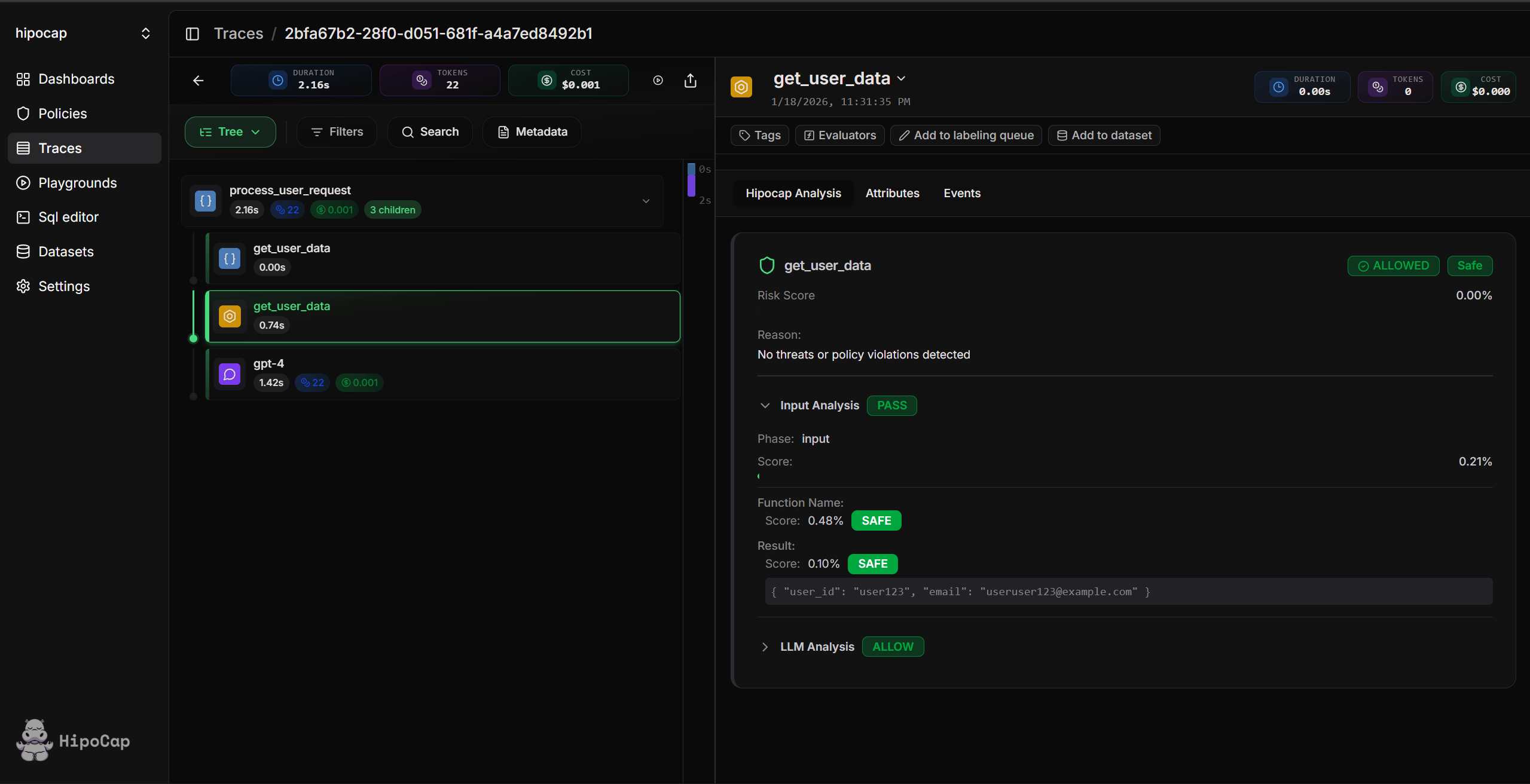
  3. View in dashboard: Open your Hipocap dashboard to see traces and security events
Example trace screenshot

Next Steps

Using LLM Assistants for Setup (Optional)

Want an LLM (or coding agent) to help with setup? Pick the prompt that matches what you’re doing and paste it into your assistant along with your codebase context. How to use:
  1. Choose the prompt that matches your scenario
  2. Click the button to copy the prompt
  3. Paste it into your LLM assistant (Claude, ChatGPT, etc.) along with your codebase
  4. The assistant will help you set up Hipocap step-by-step
Hipocap Shield currently supports Python only. TypeScript/JavaScript support is not available. If something looks off, follow the docs in this repo (or ask support) over the model’s output.